English
 日本語
日本語Obtain System Information & Diagnostic Log from Plugin Window
- Applicable Product
- A.O.M. Audio Plug-ins version 1.18.7 and later
- Last Updated
- 2026-08-20
A.O.M. plugins feature a logging mechanism for analyzing issues when they occur. Sending system information and analysis logs to the help desk can assist in troubleshooting.
- Open any plugin window.
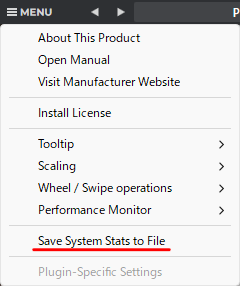
- Click menu button at left-top of plugin window.
- Select
Save System Stats to Filemenu. - The file save dialog will open; save the file to a location of your choice.
- Attach the saved log file to an email and send it to the help desk.